
Workshop
Manager and up to 2 mechanics
€29/month
or €24/month on the yearly plan
Type the number plate and see everything that was done, when and by whom.
Username demo.gestor, the password is the same.


“What was done on my bike over the last three years?”
Type what you know about the bike, the way you’d say it at the counter. Search looks through bikes, customers and orders at once.
"harley" shows the Harley bikes, the customer Harley Fernandes and those bikes’ orders, each in its own tab.
"harley yellow" keeps only the yellow Harleys. The year counts too: "honda 2003".
Number plate, name, phone, tax number or work order number.
Between work orders you see the km the bike did and how long it has been.
Fold an owner and you get a summary: the period, the work orders and the mileage.
The date the bike changed hands, from whom to whom. Tap a name to open the customer’s record.

Search the number plate and open the work order from the bike’s page. The mileage from the last visit is already filled in; you only write the diagnosis.
Tasks, parts, hours and photos, with the name of who did them. The next status is one tap away: "It’s ready" or "Put on hold…", which asks what it is waiting for. Even on a weak signal.
Copy the bike-ready message and send it through the customer’s WhatsApp or Instagram.
Every bike in its status, how long it has been waiting and which parts are missing. No customer names, no prices.
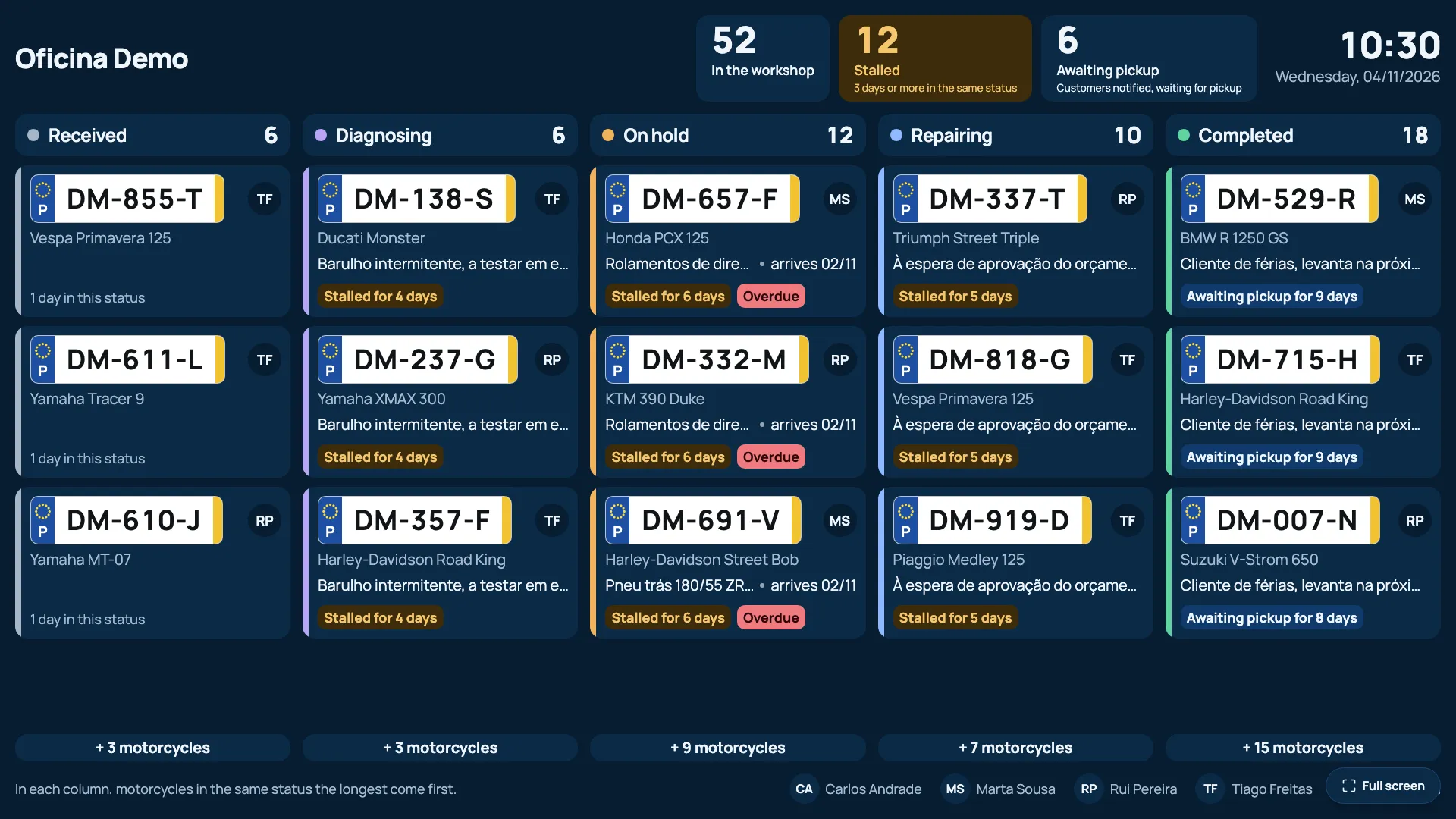
From each bike’s history to the board on the wall. Each feature has its own page, with more detail.
We call you to understand how your workshop works and answer your questions.
We create the workshop with an address of its own and hand over the accounts for the manager and the mechanics.
On the phone and the computer, nothing to install. The first bike that comes in already has a history. At the end you decide whether to carry on.
The first 30 days are free. The manager is always included. Prices exclude VAT.
Manager and up to 2 mechanics
€29/month
or €24/month on the yearly plan
Manager and up to 5 mechanics
€49/month
or €41/month on the yearly plan
Manager and up to 10 mechanics
€79/month
or €66/month on the yearly plan
We set up your workshop and hand over the accounts for the manager and the mechanics. You use everything for 30 days with the workshop’s real work and at the end you decide whether to carry on.
No. MotoGarageFlow organises the workshop’s work and the bikes’ history. Invoices stay in your certified invoicing software.
No. It opens in the browser on your phone, computer or TV, and you can add it to your home screen like an app.
Partly. Offline you can open work orders, take photos, log hours, change statuses and write notes, and everything is sent when the connection comes back. Editing customers and bikes needs a connection.
Only the people in your workshop. Each workshop’s data is kept separate, and support only gets in with the manager’s permission.
30 days free. Leave your details and we’ll call you. There’s no account to create: we set up the workshop and hand over the logins.
Want to look now? Sign in to the demo with the username demo.gestor (the password is the same).Open the demo
We’ll call you to set up your workshop.
Development mode: nothing was sent.
We use Google Ads cookies to learn which ads bring contact requests. We only turn them on if you accept. Learn more