
Everything MotoGarageFlow does in your workshop.
Organised by part of the workshop. The ones with their own page explain it all in detail.
Username demo.gestor, the password is the same.

History by number plate
Every work order on the bike, with dates, mileage and what was done, grouped by owner.
A search that gets what you mean
Number plate, name, phone, tax number or work order number. "harley yellow" keeps only the yellow Harleys.
Register in seconds
The number plate takes the right format as you type; make and model come from a list.
Change of owner
Hand the bike to its new owner and the old orders stay on its record.

Opened from the bike
Search the number plate and open the order from the bike’s record, with the last visit’s mileage already filled in.
Jobs, parts, hours and photos
Each job with the name of who did it, and up to 10 photos per order.
The next status in one tap
"It’s ready", "Put on hold…". Made a mistake? Undo it within 8 seconds.
Missing parts on their own line
Tick the parts that are missing: they show "Missing" in red, with "Arrived" one tap away. Last one in? The bike goes back to repair by itself.
Hand over and notify
The bike-ready message already lists the work done, the parts and the total to pay. Copy it and send it through the customer’s channel.

A status for every moment
Received, diagnosing, on hold, repairing, completed and delivered. The whole team knows where each bike is.
On hold, with the reason
Parts, customer approval, the customer, supplier or other. The reason shows on the card: "On hold · Parts".
Time stopped in plain sight
A bike stuck in the same status for days is flagged on its card, with the number of days.
Fitted to your workshop
We adapt the flow with you: more or fewer statuses and the waiting reasons that make sense for you.

Items with code and price
Oils, filters, brake pads, tyres: each item with a code, a unit and a sale price.
Services by the hour or at a fixed price
A full service is charged by the hours logged; fitting a tyre has a fixed price.
Packages by make and model
The Honda PCX 125 oil change goes into the order in one tap, with the right quantities.
Discounts and VAT
A discount on the package or at the end of the order, and prices with VAT included if that’s how you work.
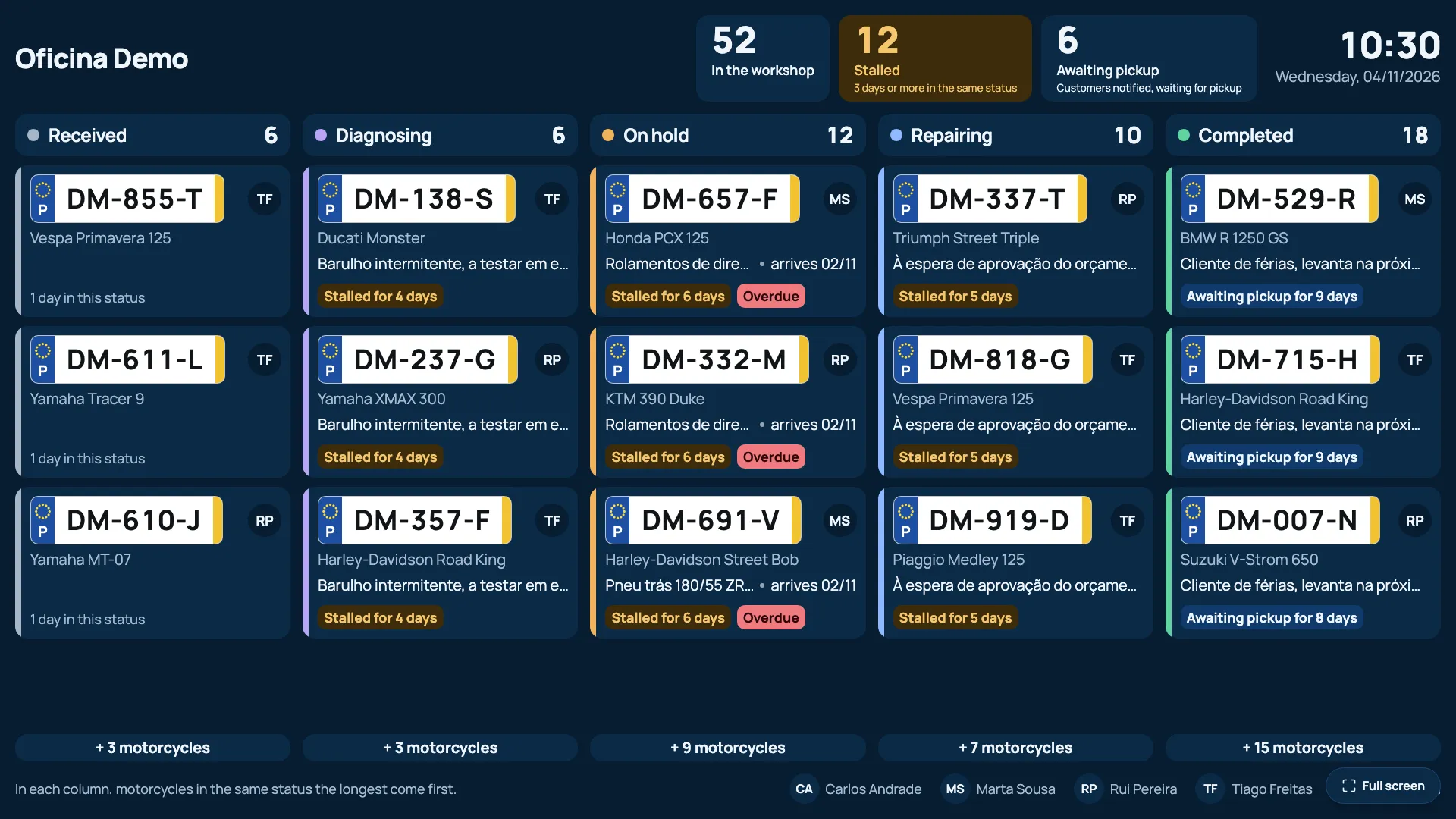
Workshop board on the TV
The bikes in each status, on a screen at the back of the room, always up to date.
The manager’s home
What’s stuck, who still needs a call and what is waiting for another reason, at a glance.
A queue, not a pile
The bike that has waited longest comes first.
Team and control
Manager and mechanics
Each with their own account. Mechanics see their work and never see prices or customers’ tax details.
Who takes each bike
The mechanic who moves an unassigned order forward takes it. The manager decides whether they can swap them.
Everything is logged
Each change keeps who made it and when, and the manager sees the workshop’s activity.
Your workshop’s look

Your logo
It shows on the login and at the top of the app, for the whole team.
Your workshop’s colours
12 themes of colours and type. Try one in the app before applying it; once applied, it changes for the whole team and the TV board.
Your own address
The workshop’s app opens at its own address, with its name.
Light or dark
Each person picks light or dark mode on their own device.
Anywhere in the workshop
Works with a weak signal
What you log offline goes through on its own when the connection is back.
Phone and computer
The same app on the phone in the workshop and on the office computer.
Your workshop’s data
Only your team sees it; support only gets in if the manager allows it.
Start with your workshop.
30 days free. Leave your details and we’ll call you. There’s no account to create: we set up the workshop and hand over the logins.
Want to look now? Sign in to the demo with the username demo.gestor (the password is the same).Open the demo
Request received.
We’ll call you to set up your workshop.
Development mode: nothing was sent.